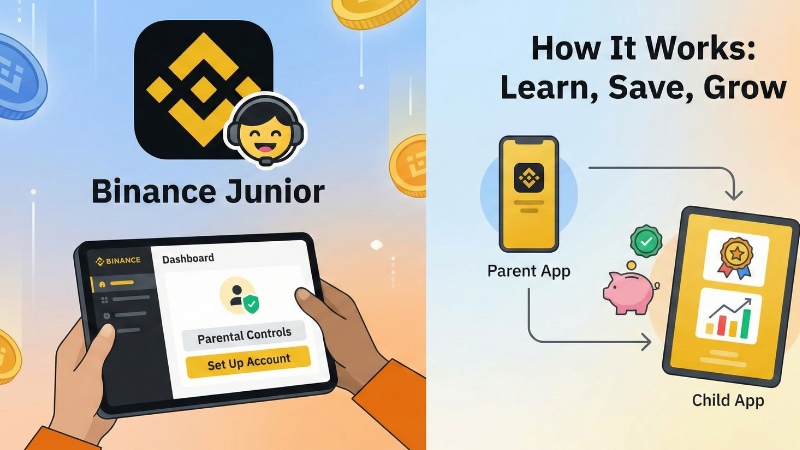
Binance Junior is the latest addition to Binance’s expanding ecosystem, created to help families introduce children and teenagers to digital finance in a safe and structured way. It is built as a parent-controlled app and sub-account for users aged 6 to 17. The goal is simple: give young people early exposure to saving behaviour and digital assets, while keeping full authority and visibility in the hands of adults.
According to Yi He, the newly appointed Binance co-CEO, the goal is to help parents guide their children towards long-term independence. She noted that financial literacy is becoming ever more critical as money and technology continue to evolve.
“Parents can take the first steps to prepare for their children’s financial future and equip them for the future financial landscape,” she said.
She also added that Binance Junior offers a way for families to develop healthy financial habits that can last into adulthood.

This explainer walks through how Binance Junior works, the safety measures built around it, and the steps parents can take to set it up for their children.
What Binance Junior is designed to do
Binance developed this app as a bridge between family money management and the growing world of digital assets. The service acts as a sub-account under a parent’s main Binance account. It allows adults to create a savings-style crypto portfolio for their child, manage the funds at all times, and introduce financial concepts using practical tools rather than theory alone.
The account is not built for trading or speculation. Binance blocks access to buying, selling or swapping tokens. Instead, the focus is on long-term savings. Funds deposited in a Binance Junior account can be placed into Binance Flexible Simple Earn, where they generate yield without exposing the young user to complex decision-making. This creates a familiar savings experience rather than an investment platform.
Parents can fund the account from their own Binance wallet or receive on-chain transfers directly into the junior account. Once funded, the child can view their balance and track how their savings grow over time. This creates a simple feedback loop that encourages conversations about financial discipline and planning for the future.
Built-in safeguards and parental controls
The app is designed to support both crypto-savvy families and households new to digital assets. Binance keeps the interface clean, with an emphasis on clear menus and straightforward features suitable for younger users.
Every action inside the junior environment is shaped by parental oversight. Adults control the setup process, approve all permissions and see every transaction. Binance also enforces strong restrictions on the movement of funds. Transfers to adult users other than the parent are blocked, and withdrawals remain limited.

Children aged 13 and above may initiate transfers, such as sending funds back to the parent account or another approved junior account. This is still governed by local regulations, which may require a higher minimum age depending on the country. Daily transfer limits remain in place to avoid large movements of funds. Parents receive real-time notifications for each action and can disable the Junior account immediately if needed. This hard stop function ensures parents can intervene at any moment.
Also read: Binance appoints co-founder Yi He as co-CEO to oversee user growth and marketing
Binance has positioned the app within a broader family finance strategy that focuses on education. The company has also released “ABCs of Crypto”, a children’s book that introduces basic crypto concepts in a friendly, illustrated style. It covers topics such as blockchain, digital security and different kinds of digital currencies.
How to set up Binance Junior for your child
Setting up Binance Junior is straightforward. Parents begin by logging into their main Binance account. From there, they access the family finance section and create a new Junior sub-account. The system prompts the adult to enter details for the child and review permission settings.
Once the sub-account is created, parents choose how to fund it. They can move assets from their own Binance wallet or send funds from an external wallet through on-chain transfer. After funding, parents can activate Simple Earn to start generating yield. They then download the Binance Junior app from the Apple App Store or Google Play Store on the child’s device and link it to the newly created sub-account.

The child can now view their balance and interact with the simplified dashboard. All activities remain visible to the parent through their main Binance app.
Binance Junior reflects a shift in how digital-first households approach money. With more people viewing crypto as part of long-term savings, tools like this are emerging to help younger generations understand digital value early and responsibly. Binance expects to expand the app to more regions as regulatory approvals progress.
Parents can explore full details and onboarding resources via the official Binance Junior page.